Smart home 개발 - 조명 제어#
Phone으로 불을 켜고 끌수 있는 스마트홈 시스템을 직접 만들기로 했습니다.
이것이 된다면 여러가지 편리한 기능을 사용할 수 있습니다.
- 침대에 누운채로 Phone으로 불을 켜고 끄기
- 깜빡 잊고 불을 켜고 외출했을때 집 밖에서 불 끄기
- 밤 12시가 되면 모든 불을 자동으로 끄기
- 아침 7시가 되면 자동으로 불 켜기
- 외출했다가 집에 들어왔을때 자동으로 불 켜기
- 집에 아무도 없다면 자동으로 불 끄기
상상만해도 너무 편리할 것 같습니다.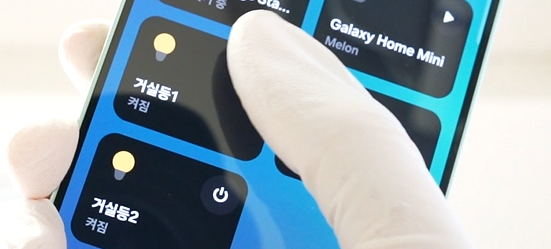
Wallpad 확인하기#
가장 먼저 Wallpad를 확인했습니다.
저의 집 Wallpad는 Smart home 기능을 지원하지 않습니다.
하지만, Wallpad에서 거실, 주방, 그리고 각 방의 조명을 켜고 끌 수 있습니다.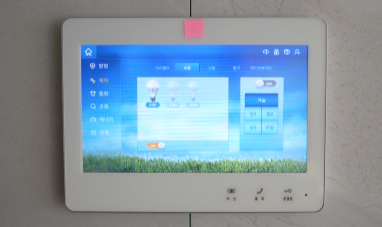
Wallpad에서 조명을 제어할 수 있다는 것이 무엇을 의미할까요?
각 조명 스위치와 Wallpad가 통신 한다는 것을 의미합니다.
따라서, 통신 라인에 조명을 제어할 수 있는 패킷을 주입할 수 있다면 조명 제어가 가능해질 것입니다.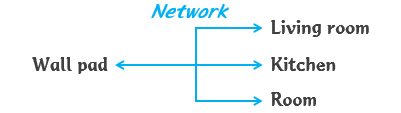
인터넷을 찾아보니 한국의 아파트는 대부분 RS485 통신을 사용한다고 합니다.
RS485는 간단한 프로토콜로 구성되어 있기 때문에 비교적 쉽게 네트워크망(이하 RS485 Bus)에 패킷을 주입할 수 있을 것으로 예상됩니다.
패킷 주입이 가능한지 확인해봅시다.
통신의 종류와 패킷 확인하기#
저의 집도 RS485 통신인지, 패킷의 복잡도가 해석할 만한 수준인지, 확인하기 위하여 USB to RS485 장치를 구입했습니다.
이 장치를 사용하면 컴퓨터의 USB를 통하여 RS485 Bus 로부터 패킷을 송/수신 할 수 있습니다.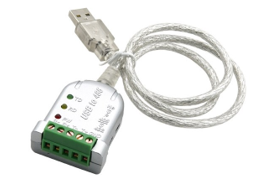
이 장치를 컴퓨터에 연결하고, 드라이버를 설치하면 COM Port로 인식됩니다.
장치 관리자에서 장치 드라이버가 정상 설치되었는지, 장치가 잘 연결되었는지 확인할 수 있습니다.
컴퓨터 환경에 따라 COM1 아니라 COM2, COM3처럼 숫자가 다를 수 있습니다.
장치를 연결했을 때 나타나고 연결해제 했을때 사라지는 COM을 확인하세요.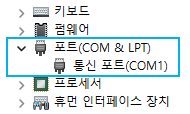
Wallpad를 뜯어서 RS485 Bus에 연결해야 합니다.
저의 집 Wallpad는 아래쪽에 볼트를 풀고, 본체를 위로 들어 올리면 쉽게 빠집니다.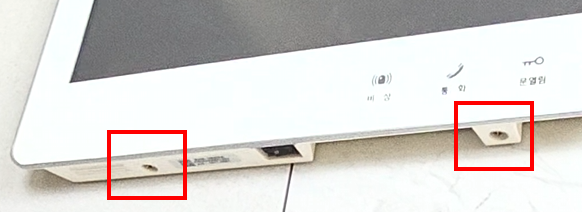
Wallpad 뒤에는 전선도 많고 복잡했습니다.
하지만, 제게 필요한 것은 오직 RS485 Bus를 연결하는 것입니다.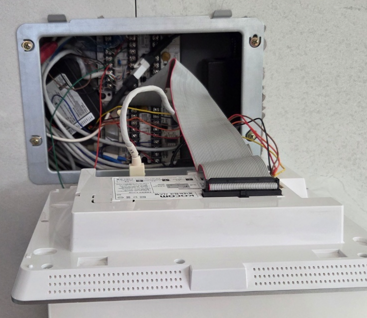
자세히 살펴보니 RS485를 연결할 수 있는 단자가 여러개로 추측됩니다.
그 중 비어있는 RS485 단자에 연결했습니다.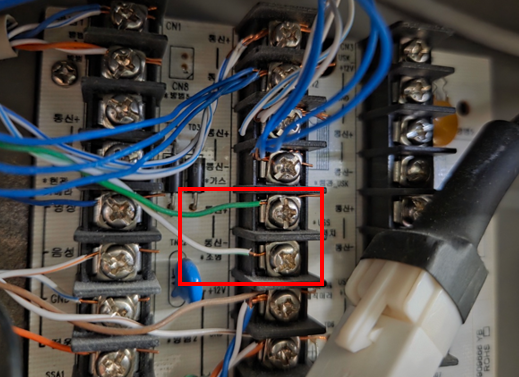
그리고, 통신 패킷을 송/수신할 수 있는 Tool을 사용했습니다.
Google에서 시리얼 통신 프로그램을 검색하면 무료 설치 가능한 Tool이 여러가지 있습니다.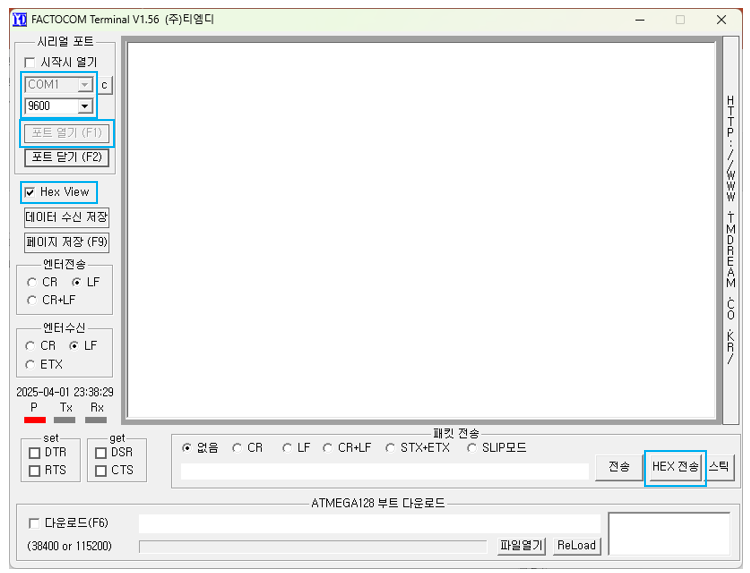
집마다 다를 수 있지만, 한국의 아파트는 대부분 Baud rate가 9600 라고 합니다.
저도 일단 Baud rate 9600 으로 설정했습니다.
USB to RS485 장치를 통하여 RS485 Bus에 연결하고 포트를 열었습니다.
그리고 주방, 방, 거실의 조명 스위치를 눌러 보면 다음 예시와 같이 무언가 패킷이 수신되는 것을 볼 수 있습니다.
조명 스위치를 켜고 끄고를 반복했더니 통신 패킷에 일정한 패턴이 있다는 것이 보였습니다.
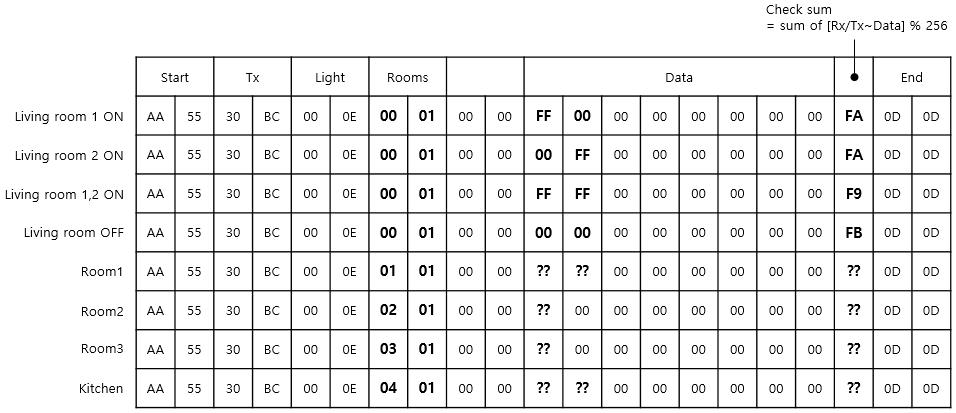
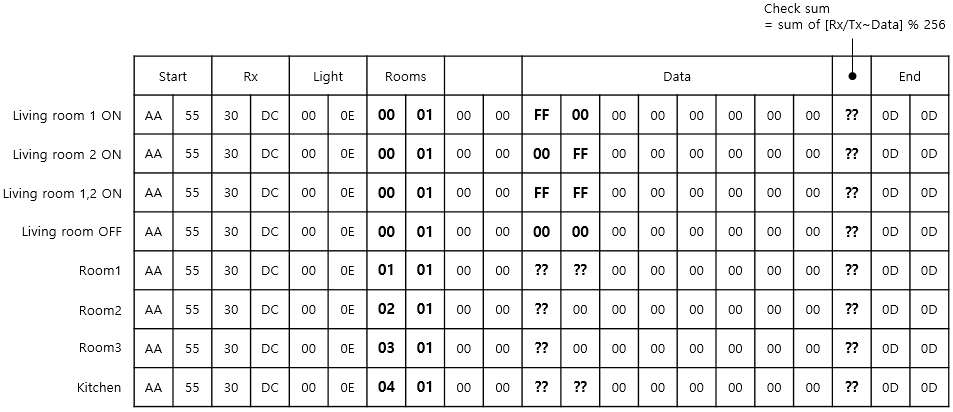
패킷을 분석한 결과, 조명을 켜고 끄는 방법은 다음 표와 같습니다.
표 안의 내용은 Hex 입니다.
(1) 조명을 켜고 끌 수 있는 송신 패킷
(2) 조명이 켜져 있는지 꺼져 있는지 확인하기 위한 수신 패킷
통신 패킷을 송/수신할 수 있는 Tool을 사용하여, 위의 (1) 송신 패킷을 주입해봤습니다.
조명을 켜는 패킷을 주입하니, 잘 켜졌습니다.
조명을 끄는 패킷을 주입하니, 잘 꺼졌습니다.
그리고, 각 방의 조명 스위치를 누르면 위 (2) 수신 패킷이 수신되었습니다.
이를 통해 각방의 조명이 켜져 있는지 꺼져 있는지 알 수 있었습니다.
RS485 Bus에 패킷을 주입하여 조명을 제어할 수 있다는 것을 알아냈습니다.
Arduino Nano Matter board를 사용하여 개발하기#
자 이제, H/W를 구성하여 스마트홈을 만들어 봅시다.
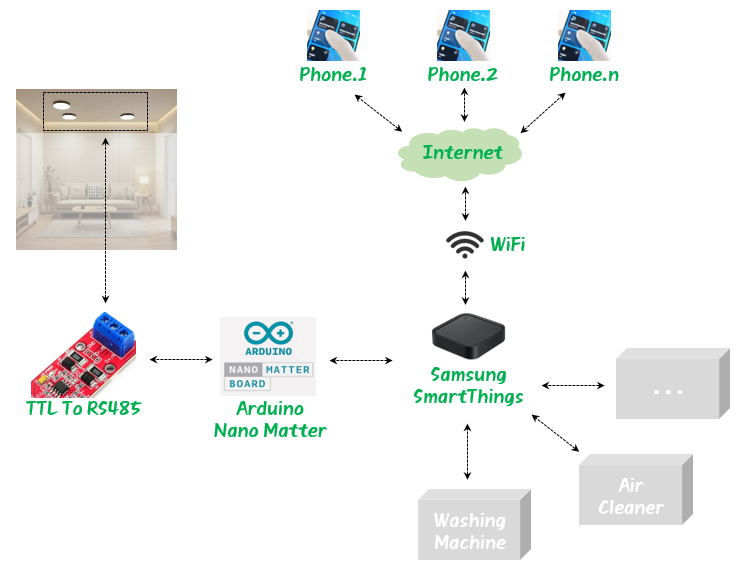
WIFI 공유기는 집에서 사용중인것을 그대로 사용했고, 다음 3개의 장치를 구매 했습니다.
- Samsung SmartThings : 집안의 각 장치와 스마트폰을 연동하는 스마트홈 Hub 역할
- Arduino Nano Matter : SmartThings와 RS485 Bus를 연결해주는 매개체 역할
- TTL To RS485 : Nano Matter의 Uart TTL 레벨을 RS485 레벨로 변환
전체적인 시스템을 다음 그림과 같이 구성했습니다.
삼성전자에서 제조한 SmartThings 는 완제품 입니다.
따라서, 설명서를 참조하여 설치하고 사용하면 됩니다.
Arduino Nano Matter board는 완제품이 아닙니다.
따라서, 어떻게 동작할지 직접 프로그래밍 해야 합니다.
제가 작성한 소스코드를 본 글의 하단에 첨부하였으니 참조하면 도움이 될 것입니다.
Arduino IDE를 사용하여 소스코드를 컴파일하고 Nano Matter 장치에 업로드 하세요.
업로드가 완료되면, Arduino IDE의 상단 메뉴에서 Tools -> Serial Monitor 기능을 켜세요.
IDE 하단에 Nano matter 장치의 로그를 확인할 수 있는 창이 뜹니다.
그 다음 Nano matter board 의 Reset 스위치를 눌러 장치를 재시작 합니다.
로그를 확인하면 SmartThings와 연결할 때 반드시 필요한 Paring code를 알려줍니다.
이 Paring code는 Nano matter board의 고유한 장치 번호입니다.
Nano matter board를 SmartThins를 통하여 Phone에 연결할 때 필요하므로 잘 적어두세요.
Matter device is not commissioned
Commission it to your Matter hub with the manual pairing code or QR code
Manual pairing code: 12345678912
QR code URL: https://project-chip.github.io/connectedhomeip/qrcode.html?data=MT%ABCDEFGHIJKLMN
하단의 소스코드를 보면 알겠지만, 통신 패킷은 Serial1을 통하여 송수신 됩니다.
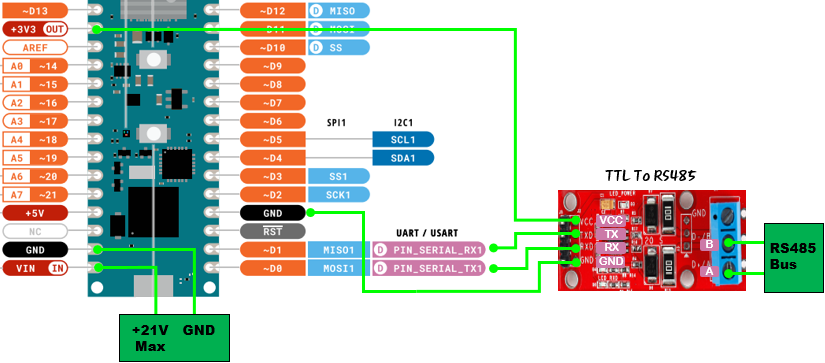
Serial1의 Pin은 Nano matter board에서 UART1 Port (D0, D1 Pin) 입니다.
D0, D1 Pin에서 출력되는 전압 레벨은 TTL 이고, RS485 Bus의 전압 레벨은 TTL이 아닙니다.
따라서, 전압 레벨을 맞추기 위하여 TTL to RS485 장치가 필요합니다.
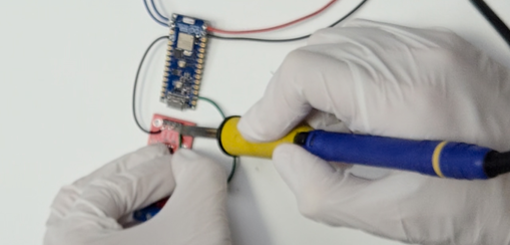
다음 그림에서 빨간색 Board가 TTL to RS485 장치 입니다.
그림의 초록색 선을 참조하여 Nano matter board와 TTL to RS485 장치를 연결하세요. (VCC, GND, RX, TX)
H/W 설치하기#
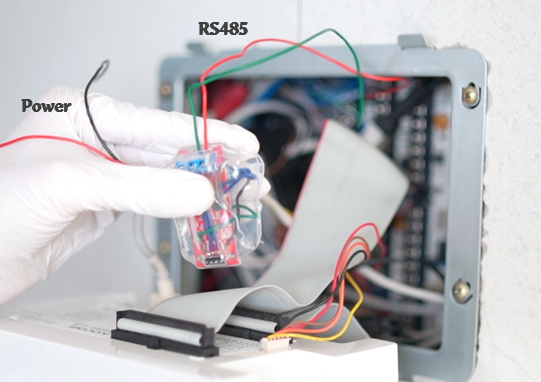
다음 그림처럼 TTL to RS485 장치를 집의 RS485 Bus에 연결하세요.
(패킷을 확인하기 위해 사용했던 USB to RS485 장치를 제거하고 그 곳에 연결해주면 됩니다.)
마지막으로, 전원선을 연결해야 합니다.
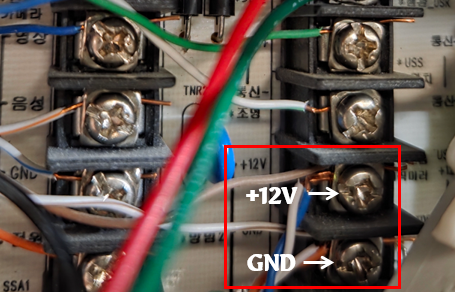
Nano matter board의 VIN Pin은 최대 +21V 까지 입력 가능합니다.
다음 그림처럼 Wallpad 뒤쪽의 통신 단자에서 +12V를 제공하고 있으므로, 여기에 연결했습니다.
여기까지 하면 설치를 완료한 것입니다.
Phone에 연결하기#
Nano matter board의 Reset 버튼을 눌러 장치를 재시작하세요.
그리고, Paring code를 사용하여 스마트폰에 장치를 등록하세요.
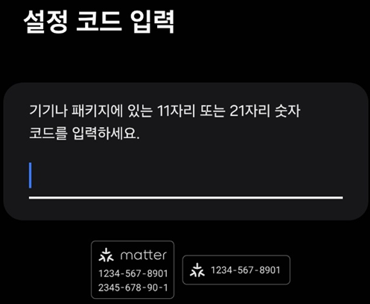
이제부터는 Phone으로 집안의 조명을 제어할 수 있습니다.
매우 편리합니다 !
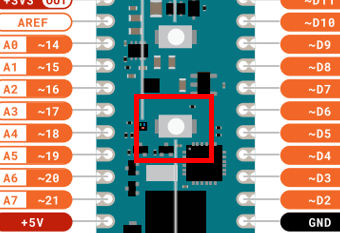
혹시, Nano matter board 에서 Paring을 해제하고 싶다면 다음 버튼을 5초이상 누르면 됩니다.
LED가 몇번 깜빡이면서 Paring이 해제 됩니다.
아래 소스코드를 참조하면, Paring 해제하는 부분이 있으니 참고하세요.
Code (Arduino Nano Matter)#
#ifndef LED_BUILTIN_1
#define LED_BUILTIN_1 PA0
#endif

#define DATA_SIZE      (21)

#define PACKET_START1  (0xAA)
#define PACKET_START2  (0x55)
#define PACKET_END1    (0x0D)
#define PACKET_END2    (0x0D)

#define LIVINGROOM     (0x0001)
#define ROOM1          (0x0101)
#define ROOM2          (0x0201)
#define ROOM3          (0x0301)
#define KITCHEN        (0x0401)


#include <Matter.h>
#include <MatterLightbulb.h>


MatterLightbulb device_livingroom_1;
MatterLightbulb device_livingroom_2;
MatterLightbulb device_kitchen_1;
MatterLightbulb device_kitchen_2;
MatterLightbulb device_room1_1;
MatterLightbulb device_room1_2;
MatterLightbulb device_room2;
MatterLightbulb device_room3;


bool status_livingroom_1 = false;
bool status_livingroom_2 = false;
bool status_kitchen_1 = false;
bool status_kitchen_2 = false;
bool status_room1_1 = false;
bool status_room1_2 = false;
bool status_room2 = false;
bool status_room3 = false;


void setup()
{
  Serial.begin(115200);
  Serial1.begin(9600);
  Matter.begin();

  device_livingroom_1.begin();
  device_livingroom_2.begin();
  device_kitchen_1.begin();
  device_kitchen_2.begin();
  device_room1_1.begin();
  device_room1_2.begin();
  device_room2.begin();
  device_room3.begin();

  pinMode(LED_BUILTIN, OUTPUT);
  digitalWrite(LED_BUILTIN, LED_BUILTIN_INACTIVE);
  pinMode(LED_BUILTIN_1, OUTPUT);
  digitalWrite(LED_BUILTIN_1, LED_BUILTIN_INACTIVE);

  pinMode(BTN_BUILTIN, INPUT_PULLUP);

  Serial.println("Matter multiple lightbulbs");

  if (!Matter.isDeviceCommissioned()) {
    Serial.println("Matter device is not commissioned");
    Serial.println("Commission it to your Matter hub with the manual pairing code or QR code");
    Serial.printf("Manual pairing code: %s\n", Matter.getManualPairingCode().c_str());
    Serial.printf("QR code URL: %s\n", Matter.getOnboardingQRCodeUrl().c_str());
  }
  while (!Matter.isDeviceCommissioned()) {
    delay(200);
  }

  Serial.println("Waiting for Thread network...");

  while (!Matter.isDeviceThreadConnected()) {
    delay(200);
    decommission_handler();
  }

  Serial.println("Connected to Thread network");
  Serial.println("Waiting for Matter device discovery...");

  while (
       !device_livingroom_1.is_online()
    || !device_livingroom_2.is_online()
    || !device_kitchen_1.is_online()
    || !device_kitchen_2.is_online()
    || !device_room1_1.is_online()
    || !device_room1_2.is_online()
    || !device_room2.is_online()
    || !device_room3.is_online()
  ) {
    delay(200);
    decommission_handler();
  }

  for (uint8_t i = 0u; i < 5u; i++) {
    digitalWrite(LED_BUILTIN, !(digitalRead(LED_BUILTIN)));
    delay(200);
  }
  digitalWrite(LED_BUILTIN, LED_BUILTIN_INACTIVE);

  Serial.println("Matter devices are now online");

  light_control(LIVINGROOM, false, false);
  delay(200);
  light_control(ROOM1, false, false);
  delay(200);
  light_control(ROOM2, false, false);
  delay(200);
  light_control(ROOM3, false, false);
  delay(200);
  light_control(KITCHEN, false, false);
  delay(200);

  device_livingroom_1.set_onoff(false);
  device_livingroom_2.set_onoff(false);
  device_room1_1.set_onoff(false);
  device_room1_2.set_onoff(false);
  device_room2.set_onoff(false);
  device_room3.set_onoff(false);
  device_kitchen_1.set_onoff(false);
  device_kitchen_2.set_onoff(false);

  serial1_buffer_clear();
}


void loop()
{
  decommission_handler();

  for (int i = 0; i < 128; i++)
  {
    refresh_light_status();
  }

  livingroom_handle();
  room1_handle();
  room2_handle();
  room3_handle();
  kitchen_handle();

  delay(1);
}


void serial1_buffer_clear()
{
    while (Serial1.available() > 0)
    {
        Serial1.read();
    }
}


unsigned char get_checksum(unsigned char* data)
{
  int sum = 0;
  for (int i = 0; i < 16; i++)
  {
    sum += data[i];
  }
  return sum % 256;
}


unsigned short read_rx_buffer(bool* light_1, bool* light_2)
{
  *light_1 = false;
  *light_2 = false;
  unsigned char rx[DATA_SIZE] = {0,0,0,0,0, 0,0,0,0,0, 0,0,0,0,0, 0,0,0,0,0, 0};
  int idx = 0;
  bool packetReceived = false;
  while (Serial1.available() > 0)
  {
    delay(2);
    unsigned char onebyte = Serial1.read();

    if (idx == 0 && onebyte == PACKET_START1)
    {
      rx[idx++] = onebyte;
      continue;
    }
    if (idx == 1 && rx[idx-1] == PACKET_START1 && onebyte == PACKET_START2)
    {
      rx[idx++] = onebyte;
      continue;
    }
    if (idx == DATA_SIZE-2 && onebyte == PACKET_END1)
    {
      rx[idx++] = onebyte;
      continue;
    }
    if (idx == DATA_SIZE-1 && rx[idx-1] == PACKET_END1 && onebyte == PACKET_END2)
    {
      rx[idx++] = onebyte;
      if (get_checksum(&rx[2]) != rx[18])
      {
        Serial.println("Checksum error");
        return 0x00;
      }
      Serial.println("Packet received");
      packetReceived = true;
      break;
    }
    if (idx >= 2 && idx < DATA_SIZE)
    {
      rx[idx++] = onebyte;
      continue;
    }
  } // while end

  if (packetReceived)
  {  // AA55 30DC 000E SITE 0000 DATA
    if (rx[2] != 0x30 || rx[3] != 0xDC ||
        rx[4] != 0x00 || rx[5] != 0x0E ||
        rx[8] != 0x00 || rx[9] != 0x00)
    {
      return 0x00;
    }
    if (rx[10] == 0xFF)
    {
      *light_1 = true;
    }
    if (rx[11] == 0xFF)
    {
      *light_2 = true;
    }
    if ( (((unsigned short)rx[6])<<8 | rx[7]) == LIVINGROOM )
    {
      return LIVINGROOM;
    }
    else if ( (((unsigned short)rx[6])<<8 | rx[7]) == ROOM1 )
    {
      return ROOM1;
    }
    else if ( (((unsigned short)rx[6])<<8 | rx[7]) == ROOM2 )
    {
      return ROOM2;
    }
    else if ( (((unsigned short)rx[6])<<8 | rx[7]) == ROOM3 )
    {
      return ROOM3;
    }
    else if ( (((unsigned short)rx[6])<<8 | rx[7]) == KITCHEN )
    {
      return KITCHEN;
    }
  }

  return 0x00;
}


void refresh_light_status()
{
  bool light_1, light_2;
  unsigned short site = read_rx_buffer(&light_1, &light_2);
  if (site == LIVINGROOM)
  {
    Serial.println("from Living room");
    device_livingroom_1.set_onoff(light_1);
    device_livingroom_2.set_onoff(light_2);
    status_livingroom_1 = light_1;
    status_livingroom_2 = light_2;
  }
  else if (site == ROOM1)
  {
    Serial.println("from Main room");
    device_room1_1.set_onoff(light_1);
    device_room1_2.set_onoff(light_2);
    status_room1_1 = light_1;
    status_room1_2 = light_2;
  }
  else if (site == ROOM2)
  {
    Serial.println("from Room2");
    device_room2.set_onoff(light_1);
    status_room2 = light_1;
  }
  else if (site == ROOM3)
  {
    Serial.println("from Room3");
    device_room3.set_onoff(light_1);
    status_room3 = light_1;
  }
  else if (site == KITCHEN)
  {
    Serial.println("from Kitchen");
    device_kitchen_1.set_onoff(light_1);
    device_kitchen_2.set_onoff(light_2);
    status_kitchen_1 = light_1;
    status_kitchen_2 = light_2;
  }
}


void decommission_handler()
{
  if (digitalRead(BTN_BUILTIN) != LOW || !Matter.isDeviceCommissioned()) {
    return;
  }
  uint32_t start_time = millis();
  while (digitalRead(BTN_BUILTIN) == LOW) {
    uint32_t elapsed_time = millis() - start_time;
    if (elapsed_time < 5000u) {
      yield();
      continue;
    }
    for (uint8_t i = 0u; i < 10u; i++) {
      digitalWrite(LED_BUILTIN, !(digitalRead(LED_BUILTIN)));
      delay(100);
    }
    Serial.println("Starting decommissioning process, device will reboot...");
    Serial.println();
    digitalWrite(LED_BUILTIN, LED_BUILTIN_INACTIVE);
    Matter.decommission();
  }
}


void light_control(unsigned short site, bool light_1, bool light_2)
{
  //AA55  30BC  000E  0001  0000  0000000000000000  FB  0D0D
  unsigned char tx[DATA_SIZE] = {0xAA,0x55, 0x30,0xBC, 0x00,0x0E, 0x00,0x01, 0x00,0x00, 0x00,0x00,0x00,0x00,0x00,0x00,0x00,0x00, 0xFF, 0x0D,0x0D};
  tx[6] = site>>8;
  tx[7] = site;
  if (light_1)
  {
    tx[10] = 0xFF;
  }
  if (light_2)
  {
    tx[11] = 0xFF;
  }
  tx[18] = get_checksum(&tx[2]);

  Serial1.write(tx, sizeof(tx));
  delay(200);
  serial1_buffer_clear();
}


void livingroom_handle()
{
  bool light_1 = device_livingroom_1.get_onoff();
  bool light_2 = device_livingroom_2.get_onoff();
  if (status_livingroom_1 != light_1 || status_livingroom_2 != light_2)
  {
    status_livingroom_1 = light_1;
    status_livingroom_2 = light_2;
    light_control(LIVINGROOM, light_1, light_2);
    Serial.println("Light control : LIVINGROOM");
  }
}

void room1_handle()
{
  bool light_1 = device_room1_1.get_onoff();
  bool light_2 = device_room1_2.get_onoff();
  if (status_room1_1 != light_1 || status_room1_2 != light_2)
  {
    status_room1_1 = light_1;
    status_room1_2 = light_2;
    light_control(ROOM1, light_1, light_2);
    Serial.println("Light control : ROOM1");
  }
}

void room2_handle()
{
  bool light_1 = device_room2.get_onoff();
  if (status_room2 != light_1)
  {
    status_room2 = light_1;
    light_control(ROOM2, light_1, false);
    Serial.println("Light control : ROOM2");
  }
}

void room3_handle()
{
  bool light_1 = device_room3.get_onoff();
  if (status_room3 != light_1)
  {
    status_room3 = light_1;
    light_control(ROOM3, light_1, false);
    Serial.println("Light control : ROOM3");
  }
}

void kitchen_handle()
{
  bool light_1 = device_kitchen_1.get_onoff();
  bool light_2 = device_kitchen_2.get_onoff();
  if (status_kitchen_1 != light_1 || status_kitchen_2 != light_2)
  {
    status_kitchen_1 = light_1;
    status_kitchen_2 = light_2;
    light_control(KITCHEN, light_1, light_2);
    Serial.println("Light control : KITCHEN");
  }
}