Memory Access Permissions in Windows User mode and Kernel mode#
Background#
On July 19, 2024, many computers worldwide using Windows experienced a blue screen issue.
A blue screen on Windows indicates a critical error that requires a computer reboot.
This led to a paralysis of crucial systems including businesses, public organizations, and airports as they went down.
The cause is said to be a flaw in a widely used security software.
Typically, common software rarely triggers a blue screen problem.
What was different about this security software that caused the blue screen issue?
Let’s explore and find out.
User mode and Kernel mode#
Windows programs utilize two main modes.
- User mode
- Kernel mode
Most software developers write code that operates in User mode when developing programs.
(Even when using Kernel mode partially, such as for reading/writing files, they use safe APIs provided by the OS.)
Such programs rarely cause a blue screen.
This is because User mode programs run under the strict control of the OS, and if they attempt any improper actions, the OS blocks them.
However, code operating in Kernel mode is almost not controlled by the OS.
Such programs have nearly all permissions, including controlling the CPU, memory, and other hardware devices, hence, a wrong action can lead to a blue screen.
In other words, an error in Kernel mode can turn into a very critical program that cripples the computer.
Therefore, from the background mentioned above, it is highly likely that the security software discussed operates by directly developing and utilizing Kernel mode.
User mode is also called User level or Ring3 level, while Kernel mode is referred to as Kernel level or Ring0 level.
Differences between the two modes from the perspective of memory(RAM) access#
Typically, Windows applications that are developed operate at the User level.
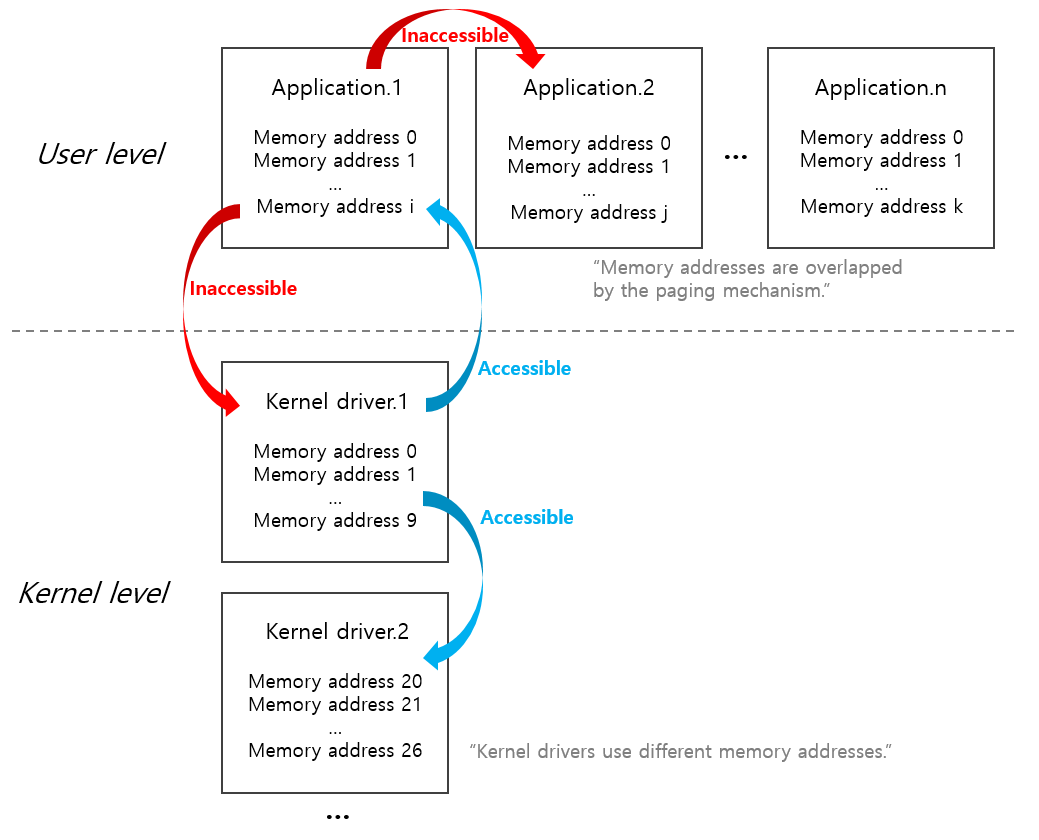
These User level programs(processes) cannot access the memory of other programs.
This is because, due to the paging mechanism, all user level programs use memory addresses starting from location 0x0 identically.
This means one program cannot know the memory addresses of another program, and such access is not permitted by the OS.
Furthermore, they cannot access memory addresses at the Kernel level.
User level programs can only access memory addresses that are assigned to themselves.
Meanwhile, programs operating at the Kernel level are assigned unique memory addresses for use,
so multiple kernel-level programs do not overlap in memory addresses.
Kernel level programs can access memory addresses at both other Kernel levels and the User level.
Therefore, when writing Kernel-level code, it is crucial to ensure there are no errors in memory access.
If there are errors in memory access, it can lead to a blue screen.
Writing code in kernel mode must be done with great caution#
The security software mentioned in the background likely resides in memory and constantly monitors both programs running in memory and files stored on storage to prevent and eliminate risks.
This would necessitate access to various memory addresses from kernel mode.
An error in this process probably caused the blue screen error and resulted in damage to computers worldwide.
Code written in Kernel mode, as mentioned, holds permissions powerful enough to critically affect the OS.
With such great power comes great responsibility, necessitating utmost caution in development.