How a Computer Stores Numbers/Characters Using 0 and 1#
You may have heard the phrase “computers operate on 0s and 1s.” We can use computers to store characters and numbers, and even music, photos, and videos. When storing these things, only 0s and 1s are truly used. Let’s explore how data can be stored using only 0s and 1s.

What are 0 and 1?#
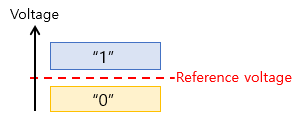
A computer is a device that operates on electricity. Therefore, voltage is used to represent 0 and 1. 0 means a relatively low voltage, typically 0 Volts. 1 means a relatively high voltage, typically 1 to 5 Volts.
How to Store 0 or 1 in a Storage Device#
As of 2025, when thinking about storage devices in computers, two main types come to mind. They are SSD and DRAM. These storage devices consist of numerous cells that can store either a 0 or a 1. A cell is a space that stores electrical energy. It can be more easily understood by comparing it to a rechargeable battery. When a cell is charged with electricity, it stores a 1; when it is not charged, it stores a 0.
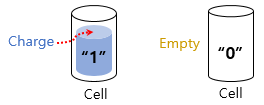
By this principle, 0 or 1 can be stored in countless cells. For reference, the physical size of a cell is extremely small. A single cell represents 1 Bit; in the case of an 8 GBit memory chip, about the size of a fingernail, there are 8,000,000,000 cells.
How Can Numbers Be Represented with 0 and 1?#
From here on, a value that holds either 0 or 1 will be referred to as a Bit. With 1 Bit, two values can be represented: 0 and 1.
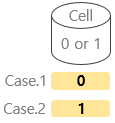
And, as mentioned earlier, since there are many cells that can store 0/1, multiple cells can be used. This means that multiple Bits can be used. Let’s look at it through a few examples. If 2 Bits are used, there are 4 cases as shown below.
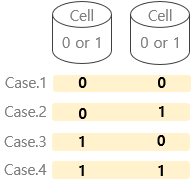
And if you assign a number to each case, you can represent numbers from 0 to 3 as follows.
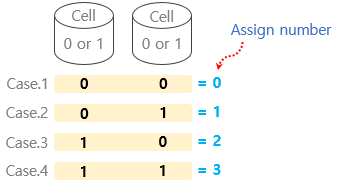
Next, let’s assign numbers using 3 Bits.
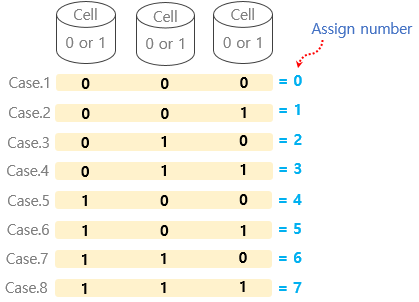
You can represent numbers from 0 to 7. As the number of Bits increases, the range of values that can be represented also grows.
How Are Characters Represented with 0 and 1?#
If you understood the numerical representation method explained above, you can easily understand the character representation method as well. You just need to assign a character to each case that can be represented in Bits, as shown below.
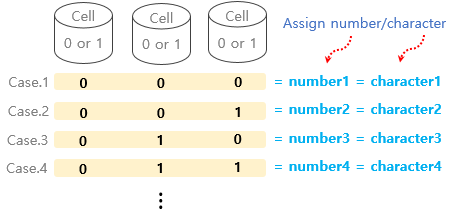
Let’s look at how to represent the English alphabet. Generally, the alphabet is represented using 7 Bits.
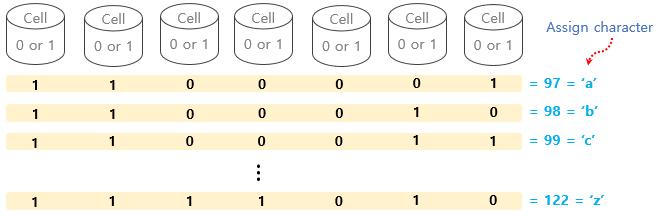
※ For reference, to represent multilingual characters and emojis, it is common to use 32 Bits to represent a character.